English
 Español
 Português
 Deutsch
 한국어
한국어 日本語
日本語 Italiano
 Français
 العربية
 Türkçe
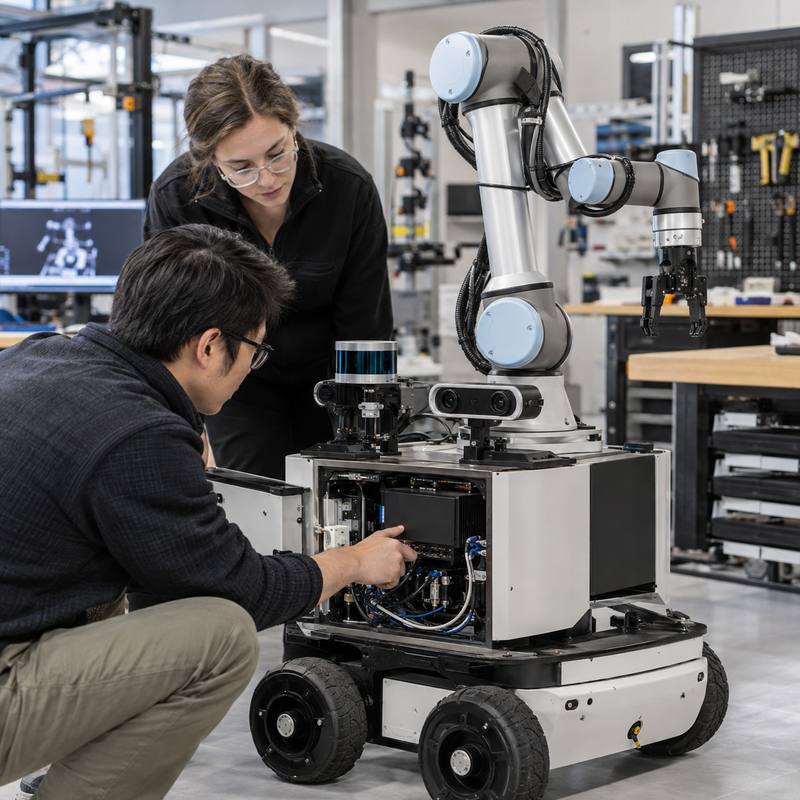
A pilot often starts with a development kit, one camera, and one model. The deployed robot may need several cameras, lidar, CAN FD, local recording, remote diagnostics, a protected enclosure, and predictable recovery after a power interruption. A useful selection process must cover that complete configuration. A peak compute figure alone cannot show whether the system will fit, connect, cool, or recover.
1. Write a one-page workload brief
Define one representative task and one difficult operating condition. For a warehouse robot, that might be pallet detection during normal travel plus recovery when one camera stream becomes unavailable. For a mobile manipulator, it might be object localization and grasp verification while the base, arm, and perception workloads run together.
| Input | Record this before comparing hardware | Why it changes the choice |
|---|---|---|
| Sensors | Model, protocol, connector, resolution, frame rate, synchronization need, cable length | Port count does not prove camera, driver, bandwidth, or cable compatibility. |
| Concurrent software | Models, precision, runtime, ROS 2 nodes, recording, visualization, remote services | A model benchmark does not represent the complete robot workload. |
| Outputs | Messages sent to the controller, PLC, fleet system, or operator | This defines the communication path and the system boundary. |
| Installation | DC supply, expected power budget, compartment dimensions, airflow, ambient range, vibration, cable clearance | Bench operation does not prove installed operation. |
| Recovery | Restart behavior, degraded mode, retained logs, service access, replacement procedure | Field recovery affects downtime and support cost. |
2. Separate mandatory constraints from preferences
Mark each requirement as must have, preferred, or future option. A candidate that misses a must-have interface or mechanical constraint should not stay in the shortlist because it has a higher TOPS number. Keep future options visible, but do not make the current pilot pay for an undefined roadmap.
3. Use the N Series as a shortlist, not a ranking
The current MScape N Series includes different interface and module configurations. The table below is a first-pass routing guide based on the 2026.7.V2 product brochure. It is not a compatibility guarantee. Confirm the delivered configuration, camera support, cables, software image, and mechanical drawing before ordering.
| Candidate | Start here when… | Move to another path when… | Confirm before evaluation |
|---|---|---|---|
| N100 Jetson Orin NX 8GB / 16GB |
You need a compact Orin NX system with four GMSL2 inputs, CAN FD, USB, and Ethernet. | The workload needs AGX Orin memory/compute options or eight direct GMSL2 inputs. | Camera drivers and connectors, simultaneous interface use, cooling, and installed height. |
| N201 Jetson AGX Orin 32GB / 64GB |
The architecture centers on USB, Gigabit Ethernet, CAN FD, and industrial communications rather than direct GMSL2 inputs. | Direct GMSL2 camera inputs are mandatory. | Peripheral power, delivered software image, recovery behavior, and enclosure cooling. |
| N203 Jetson AGX Orin 32GB / 64GB |
The robot has a camera-rich perception architecture requiring up to eight GMSL2 inputs. | The installation needs N210’s expansion-harness arrangement or a different power/interface layout. | Camera list, synchronization, two enclosure-mounted Gigabit Ethernet ports plus pin-header connection, cable routing, and workload concurrency. |
| N210 Jetson AGX Orin 32GB / 64GB |
The robot needs eight GMSL2 inputs and an automotive-style expansion harness carrying four Gigabit Ethernet and six USB 3.0 connections. | A simpler USB/Ethernet system or a different connector layout is easier to integrate. | Harness drawing, termination, cable length, sensor drivers, EtherCAT setup, and DC 9-60 V power path. |
| N1000 High-performance N Series path |
An Orin configuration does not meet the planned model, memory, or concurrent sensor workload. | The real workload fits an Orin platform with lower integration, power, or commercial cost. | Confirm the current processor configuration, precision and runtime, memory use, power supply, cooling, and camera configuration with MScape. |
4. Size compute with the real workload
Create a repeatable test package: recorded sensor data, model files, runtime versions, preprocessing and postprocessing steps, and the other services that will run at the same time. Test the complete chain in the intended power mode. Capture throughput, end-to-end latency distribution, memory use, storage throughput, temperature, throttling state, and errors. Avoid mixing results from different sensor data, precision modes, or software versions.
Example A: camera-rich warehouse perception
If the required inputs are six GMSL2 cameras plus CAN FD and two Ethernet devices, N203 and N210 are more relevant first candidates than N201. The choice between them depends on the physical Ethernet/USB connection layout, harness plan, power path, and service access. Camera count alone does not decide the result.
Example B: USB and network-connected mobile manipulator
If cameras and sensors connect through validated USB and Ethernet paths and no direct GMSL2 input is required, N201 may be the simpler starting point. Test all high-bandwidth peripherals together; individual device bring-up does not prove concurrent operation.
Example C: a larger multimodal workload
If measured Orin tests miss the application’s memory or latency target under the full sensor load, evaluate N1000. Document the model, numerical precision, runtime, input streams, and power mode so a higher headline compute figure does not substitute for application evidence.
5. Run an installed-system acceptance test
- Configuration check: record the computer model, module memory, storage, software image, firmware, cables, and connected sensors.
- Cold start and restart: verify startup order, peripheral recovery, service readiness, and log retention.
- Representative duty cycle: run the full workload long enough to reach a stable thermal condition.
- Communication exceptions: exercise approved loss, delay, or restart scenarios and record application behavior.
- Physical inspection: check connector retention, cable strain, clearance, airflow, antennas, and service access.
- Acceptance record: save raw results, pass/fail thresholds, deviations, and the exact tested configuration.
Copyable requirement sheet
Use these fields in your RFQ or pilot brief: robot type; operating environment; country of deployment; camera models and count; lidar, IMU, GNSS and other sensors; required interfaces; concurrent workloads; model/runtime/precision; target throughput and latency; storage and retention; DC input and power budget; mounting envelope; ambient range; controller and safety boundary; required certifications; quantity; evaluation date; and production schedule.
Review the MScape N Series overview, the robotics interface validation guide, and the application cases after the brief is complete.
FAQ
Is an embodied AI computer the same as a robot controller?
No. It may run perception, inference, application logic, logging, and communications. The robot architecture must separately assign motion, drive, and safety responsibilities.
How much compute headroom should we buy?
Base the decision on a measured complete workload and a defined roadmap. Keep enough headroom for known concurrency, software overhead, and operating conditions; do not use an arbitrary percentage without a repeatable test.
What should we send MScape for a useful recommendation?
Send the requirement-sheet fields above, especially sensor model numbers, connection methods, concurrent software, power and mechanical constraints, delivery country, and schedule.
Send the completed sensor, workload, interface, power, and installation brief through the MScape inquiry page. The response can then address a specific configuration and validation plan.