English
 Español
 Português
 Deutsch
 한국어
 日本語
 Italiano
 Français
 العربية
 Türkçe

A camera topic can publish at 30 frames per second and still give your perception node an old view of the scene. My starting point is two questions: can the subscriber receive the images, and how old are they when processing starts? QoS compatibility helps answer the first. Timestamps help answer the second.
Compatibility and image age come before a hardware change or a deeper queue. Here is a practical way to work through them, using ROS 2 Jazzy documentation as the reference. Check the corresponding settings in your installed distribution, driver and middleware.
Start with the subscriber, not the camera rate
If the application receives no images, inspect the publisher and the actual application subscriber. A diagnostic tool receiving frames does not prove that your perception node has compatible settings.
ros2 topic info /camera/front/image_raw --verboseReplace the example topic with your camera topic. The official topic-inspection tutorial explains the verbose output, including endpoint QoS. Save both endpoints’ settings alongside the ROS distribution, middleware, driver version and image encoding.
Reliability is a useful first check. According to the ROS 2 QoS compatibility reference, these combinations behave as follows:
| Publisher offers | Subscriber requests | Reliability compatible? |
|---|---|---|
| Best effort | Best effort | Yes |
| Best effort | Reliable | No |
| Reliable | Best effort | Yes |
| Reliable | Reliable | Yes |
Other QoS policies must also match compatibly. If a best-effort camera publisher meets a subscriber requesting reliable delivery, a bigger queue will not fix that mismatch.
Decide whether you need the latest frame or every frame
Once messages arrive, the next question is what the consumer actually needs. A live perception node, an evidence recorder and a remote preview have different priorities.
- Live perception: prioritize an acceptable image age. Decide how stale frames are rejected and whether missed frames are tolerable.
- Evidence recording: define which frames must be retained. Measure loss and recorder behavior under load rather than assuming a reliability setting guarantees a complete recording.
- Remote preview: decide whether reduced resolution or rate is acceptable without changing the live perception path.
The Jazzy reference sensor-data profile uses keep-last history, depth five, best-effort reliability and volatile durability. That is a reference starting point, not proof of your driver’s configuration or the right choice for every consumer.
Queue depth deserves the same care. With consecutive frames at an assumed 30 fps, five stored frames span about 133 ms between the oldest and newest timestamps; twenty span about 633 ms. The calculation is (frame count - 1) / frame rate. These are timestamp spans, not measured latency or bounds on processing age. I would not increase depth simply to make a drop counter look better.
A timestamp example makes the delay easier to see
The ROS Image message definition says the header timestamp should represent acquisition time. Confirm what your driver actually stamps, and put all timestamps in a common clock domain before subtracting them.
For illustration, suppose one image is acquired at 100 ms, reaches the application at 150 ms and starts processing at 190 ms. These numbers are hypothetical, not test results.
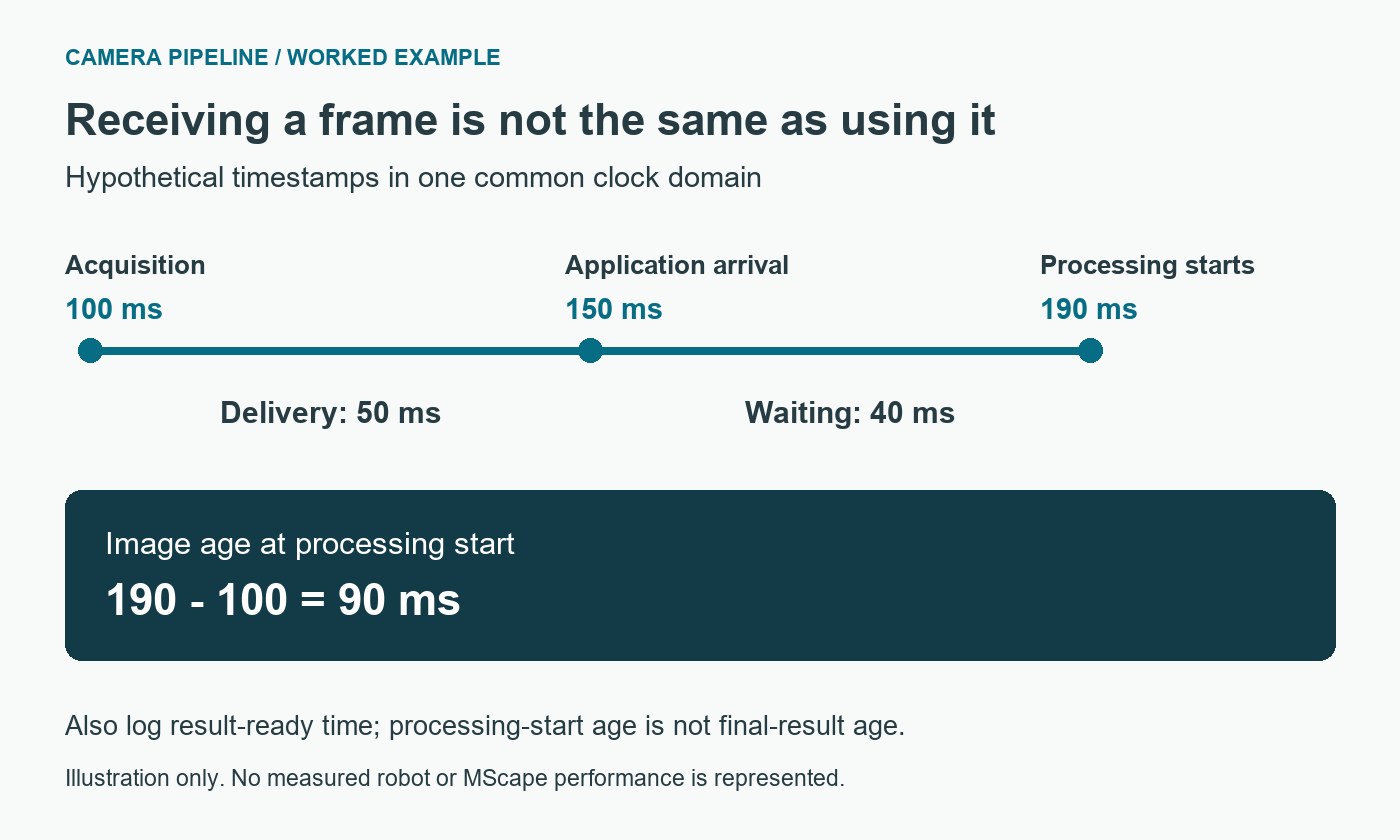
- Acquisition to arrival:
150 - 100 = 50 ms. - Waiting after arrival:
190 - 150 = 40 ms. - Image age at processing start:
190 - 100 = 90 ms.
That split tells me where to investigate. If arrival is late, inspect the driver and delivery path. If most of the delay occurs after arrival, inspect callback scheduling, synchronization and application queues. Log result-ready time as well: processing-start age alone does not describe the age of the final perception result.
For this example, an application requirement of “no more than 80 ms at processing start” would fail. That threshold is illustrative; derive your real limit from the robot’s task. Negative or inconsistent ages call for a clock check before a performance conclusion.
Two fresh images are not necessarily a synchronized pair
For stereo or sensor fusion, the difference between acquisition timestamps matters too. Two images can each be recent but describe different moments.
The approximate-time synchronizer tutorial illustrates matching stamped messages using a queue and tolerance. Software matching does not trigger simultaneous camera exposure. Check the acquisition timing as well as the matching settings.
A useful pair-level record includes each image’s age, the older image’s age, the timestamp difference and whether the pair was accepted or rejected. Choose limits for the actual perception task rather than copying a tutorial’s example tolerance.
A useful frame-age acceptance test
The goal is a record that another engineer can reproduce, not one reassuring frame-rate number. A reproducible test records:
- The configuration: camera modes, encodings, endpoint QoS, software versions and clock setup.
- The timing: acquisition, application arrival, processing start and result-ready timestamps, plus synchronization differences where relevant.
- The workload: all required cameras, inference, recording and networking running together.
- The limits: task-derived age and loss criteria, percentile and maximum observations, and the defined response to stale frames.
- The recovery: controlled overload and camera restart checks in an appropriate test environment, including how the application resumes.
The robotics interface-validation guide helps place these checks alongside interface ownership and restart responsibilities.
Distinguish a slow consumer from a transport problem
Suppose a camera produces 30 frames/s and a serial consumer needs 50 ms per frame. That consumer can process at most 20 frames/s under those assumptions. If it keeps every incoming frame, the backlog grows by about ten frames each second. A larger queue postpones overflow while allowing older images to reach the algorithm.
Measure arrival rate, processing rate and frame age together. If arrival is healthy but age grows steadily, investigate processing and queue policy before changing the network. If arrival itself has gaps, inspect the publisher, transport and QoS relationship. A topic-rate measurement alone cannot distinguish these situations.
For a task that needs the latest observation, test a bounded drop-old policy and record the resulting loss. For evidence that needs every frame, lower the required rate or provide enough sustained processing and recording capacity. Neither reliable delivery nor a shallow queue can make an overloaded consumer meet both requirements.
Where N203 and N210 fit into the decision
Only after that diagnosis would I move to the hardware shortlist. The N203 camera-rich computer and N210 robotics edge AI computer are relevant N Series paths for camera and sensor-fusion integration. The selection depends on the camera drivers, ROS distribution and measured performance of the complete workload.
For a configuration review, send MScape your perception requirements: robot task, cameras and interfaces, ROS/middleware versions, QoS, measured age and loss, concurrent workload, power/cooling constraints, quantity and delivery country.